tableau needs adding scroll vertical bar for label marks
Get link
Facebook
X
Pinterest
Email
Other Apps
-
Today 20/6/2023,
Now i'm using tableau 2023.2 version on my windows laptop, but still there is no change on the label marks. look at this below pic:
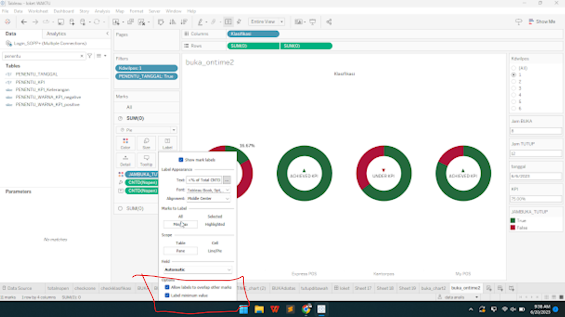
whenever i click the min/max marks to label, i can not see full the options, such as option for label maximum value. i have an idea that tableau must add like scroll vertical bar on label marks, so users can see the full option for label marks.
tableau sorting the data based on column priority, so to sort multiple measure value just do: i have 1 discrete and 2 continuous value: kcp as discrete pertumbuhanhari% as value 1 pertumbuhanhari as value 2 i want to sort kcp by pertumbuhanhari% ascending first andthen pertumbuhanhari descending second step: 1. change continuous value into discrete value 2. move the pertumbuhanhari% into first row and then pertumbuhanhari as second row and nama kpc as third row by default it would be all ascending sorting 3, sort the pertumbuhanhari into desc, by right click on pertumbuhanhari column, andthen choose sort by Nested, andthen choose descending on sort order, and then choose field name which is used, ok 4. FINISH,
hello, today is 28th december 2023, im using brand new tableau 2023.3 i'm oftenly using parameter on my dashboard, paramter is used for variable inputed coming from user, but this is real question is? who is the user? since tableau can do separate role user perfectly, which can adapt the display with what the user on (it is called user filter) role user access i'm thinking that tableau should upgrade the future, the idea is: paramter can control by specific user otherwise it would be default value, example of boolean value coming from parameter It is importanting tableau to do becasue the feature that tableau can do already awesome, but it would be more perfect if the specific user can set the value of parameter, so the goal is specific user can set the value and specific user can not do it. it would be more efficient for developer, so developer must not use extenal source data (such as like spread sheet) to update data as variable for specific role/user thank you, Bnadung, ...
so, today 18/7/2023 i use brandnew tableau 2023.2, i often use color as distinction for the measurement like category performance =0% it would fail as 'red', category reach <100% it would be progressing 'yellow' , else cateogry successfull as 'green' calculation field for making color Since my data has no performance reach 100% as successfull, there is only 0% which is fail and doing progression <100%, so the display would be fail and progression which is we could set the color also bar progression with its color so here is the problem, when there is the data reach 100% next day, it would make automatic color successfull which we can not handle it, maybe it would be blue or maybe it would be purple or orange we do not even know so here is my idea: tableau needs something like setting default properties to handle the color at first like success is green, progression is yellow and fail is red, so we as user need not to repair or even change when something...
Comments
Post a Comment